|
|||||||||||||||||||


|
|
||||||||||||||||||||||||||
|
||||||||||||||||||||||||||||||||||||||
|
|
||||||||||||||||||||||||||||||||||||||
| ||||||||||||||||||||||||||||||||||||||
|
X  UPSearch
© 2012 Troy R. Bishop Revised 2026 by Ryan Hanson |
|
X Join Us (Volunteer)
Record yourself singing or performing any track from the Winds of Urartu collection, and we'll work to integrate it into the project featuring you! This is a wonderful opportunity to be part of something meaningful. Your contribution may lead to becoming one of our featured Performers. How to participate:
|
|
(Close) X
UPSearch
Frequently Asked Questions
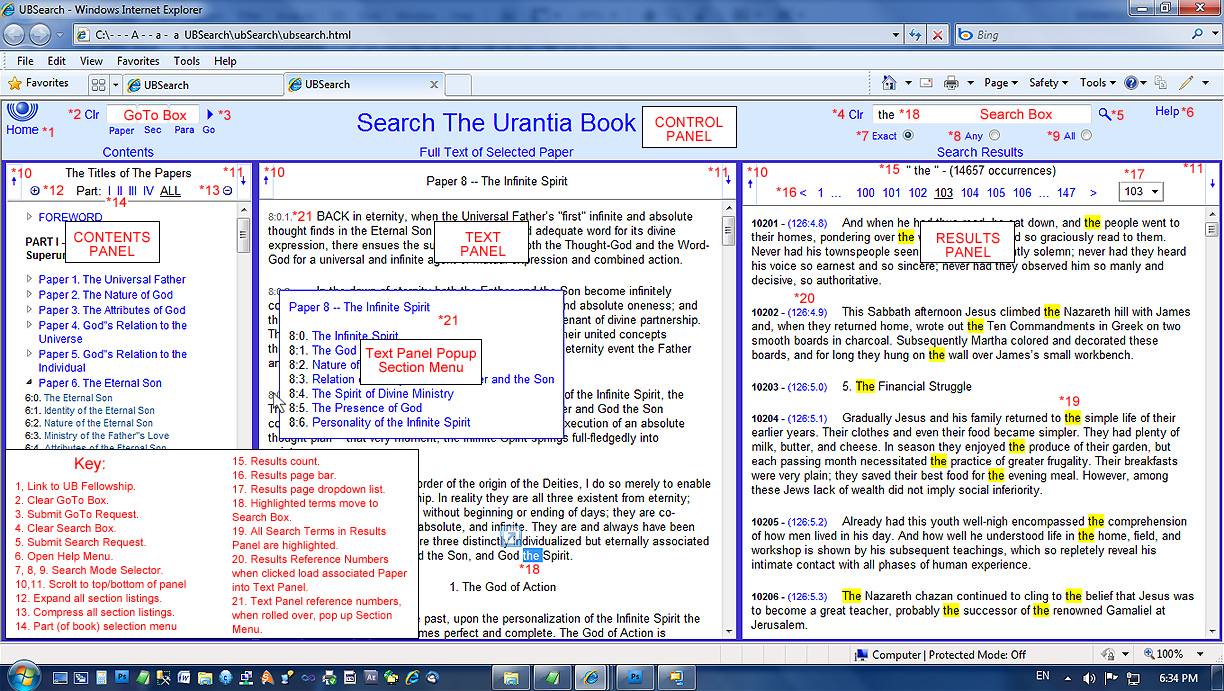
 What are the system requirements to use UPSearch? What are the system requirements to use UPSearch?You must have Windows 7 or 8 and one of the following browsers: Internet Explorer (tested on Versions 8, 9, 10, and 11), Chrome (tested on Version 31), Firefox (tested on Version 26), or Safari (tested on Version 5.1.7).
NOTE: Optional browser bars turned on above and below UPSearch (status, favorites, etc.) can hide UPSearch controls and reduce its operability. What are the search modes "Exact", "Any", and "All" for?In the "Exact" search mode, the exact phrase in the Search Box is sought.
In the "All" search mode, all lines (titles and paragraphs) that each contain all of the words in the Search Box are sought. In the "Any" search mode, all lines containing any of the words in the Search Box are sought. The "All" mode is useful to find material relating various concepts to each other; for example, "absolutes paradise" (terms are not case sensitive). The "Any" mode is useful to find text relating to a single term that is expressed in variations; for example "angel angels" or "angel angels angelic seraphim seraph seraphic". How can I type an em-dash (—) into the search box?By typing two adjacent hyphens, with no space between them and no space before or after either of them.
The search, when submitted, with be for a true em-dash and the text in the Search Box will be corrected to include the em-dash instead of the hyphens. How can I enter text automatically into the search box?By selecting text in the Text Panel or in the Results Panel. Selected text will automatically appear in the Search Box.
To avoid entering fragments of words into the Search Box, you can use PowerClick, which selects only whole words. To use PowerClick, double-click on a word and, to select multiple words, hold, and drag. Excess spaces before and after words are ignored during search. |


